Apple Integrates iPhone Widgets on Mac Desktops with macOS Sonoma and iOS 17 Update
May 30, 2026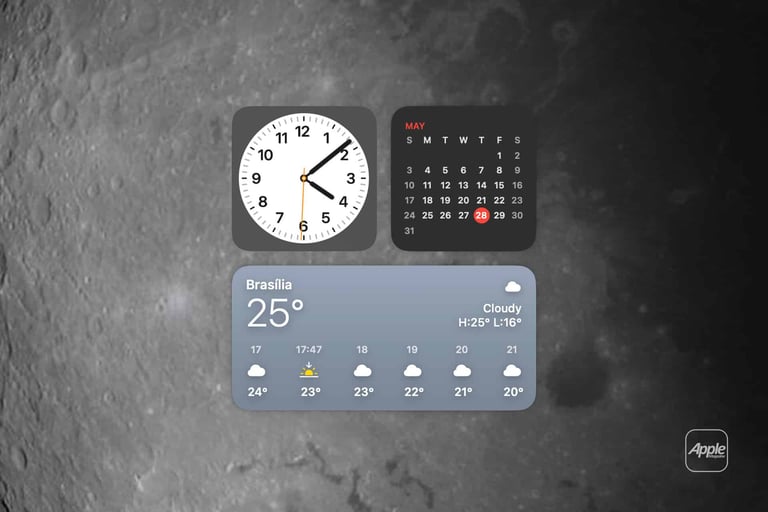

Apple enables compatible iPhone widgets to appear on Mac desktops or in the Notification Center with macOS Sonoma 14+ and iOS 17+.
Users can enable iPhone widgets in System Settings under Desktop & Dock, then add widgets from the desktop or Notification Center gallery.
Widgets rely on Continuity and require the devices to share the same Apple ID and be near each other or on the same Wi‑Fi; an iPhone app on the Mac isn’t required.
If widgets don’t appear, verify macOS Sonoma 14+ and iOS 17+ are running, that both devices share the same Apple ID, are nearby or on the same Wi‑Fi, Bluetooth/Wi‑Fi is enabled, and iPhone widgets are enabled in settings.
On Mac, you may see both Mac and iPhone widget options, with Mac widgets offering deeper integration by launching the Mac app.
iPhone widgets on Mac are designed for glanceable information and light interaction; deeper actions still require using the iPhone app.
Mac widgets can be moved, resized, edited, and customized, with an option to fade into the background when other apps are active.
Best uses include weather, calendar, reminders, package tracking, home controls, fitness, battery, travel, finance, and health summaries that don’t require constant interaction.
The feature is aimed at reducing interruptions by keeping key information visible on the Mac desktop without duplicating apps across devices, aligning with Continuity.
Not every iPhone app offers a widget; some widgets work better than others, depending on whether developers provide compatible widgets.
Some widgets may perform better than others, depending on app support and optimization by developers.
Summary based on 1 source
Get a daily email with more Tech stories
Source
AppleMagazine • May 29, 2026
Mac Desktop Widgets Bring iPhone Apps to the Screen - AppleMagazine