Canva AI Expands with Free Magic Studio Tools and Paid Plan Perks: What You Need to Know
June 21, 2026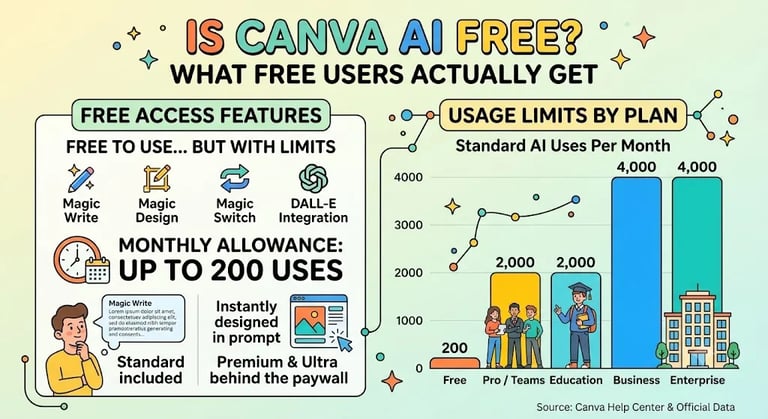

Canva AI is free to use with defined caps; free accounts get access to Magic Studio tools, while higher quotas come with paid plans; Shield provides content guardrails and admin controls.
Magic Write handles end-to-end writing tasks from outlining to summarizing; Magic Design creates styled outputs from prompts using Canva’s templates; Magic Switch translates content into over 100 languages and formats, with DALL-E integrated for image generation.
The footer notes ongoing development and future expansion of Canva AI capabilities, with references to related tools and personnel.
Safety and governance are supported by multi-layer safeguards, alignment with OpenAI baselines, Canva Shield admin controls, and collaborative Trust and Safety efforts between Canva and OpenAI.
Canva offers a Canva GPT experience inside ChatGPT for generating visuals through conversation.
Canva AI has grown to over 175 million monthly active users, with AI products used billions of times; Magic Write has generated over 10 billion words, and the asset library surpasses 100 million items.
Free accounts gain access to Magic Studio tools including Magic Write, Magic Design, Magic Switch, and the native DALL-E image generator, while certain features like Background Removal and Magic Eraser are behind the paywall.
Canva AI is free with a Canva account, but free users face monthly caps of 200 Standard AI uses or 20 Premium AI uses; higher usage requires a paid plan.
Usage limits vary by plan: Free offers 200 Standard or 20 Premium uses per month; Pro, Teams, Education, Business, and Enterprise offer higher quotas, up to 4,000 Standard, 400 Premium, and 40 Ultra for Enterprise.
Summary based on 1 source
Get a daily email with more AI stories
Source

About Chromebooks • Jun 20, 2026
Is Canva AI free to use?